Play Anime Coloring Book, a fun Coloring game you can enjoy instantly in your browser. No Download, Free to Play, and playable on PC, mobile, and tablet.
Genre: Coloring | No Download | Free to Play
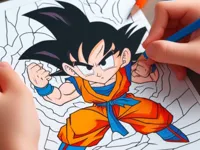
Anime Coloring Book is a relaxed browser coloring game built around simple choices: pick a picture, choose a color, and fill sections until the page looks the way you want. It is the kind of quick session you can start in seconds, whether you are aiming for a neat, clean palette or you want to experiment with bold contrasts.
If you enjoy creative games with low pressure, this fits nicely alongside other drawing and color picks on NiaGames. It is also friendly for short breaks, since most pictures can be finished in a few minutes and you can stop whenever you like.
People come back to Anime Coloring Book because it is easy to understand, but it still gives you control. You decide whether to stay close to classic anime color themes or make something totally different, and that freedom makes each finished image feel personal.
It is also a comfortable choice for a wide range of players. If you want something calm for a quick reset, the pace works well for relaxation. If you are sharing a device, the simple rules make it a good fit for family time and younger players.
Start by selecting a picture, then choose a color from the palette. Tap or click the area you want to fill, and keep going section by section until the full image is complete. If the game offers tools like an eraser or undo, use them to fix small mistakes without restarting.
For the best experience, play Anime Coloring Book in a modern browser and keep the game window large enough to avoid misclicks. On touch devices, it helps to zoom the page a bit and use slow taps, especially when you are filling smaller shapes.
The core loop in Anime Coloring Book is straightforward: pick artwork, choose a color, and apply it to a region. The challenge is not speed, it is accuracy and style. Some images have large, easy sections that you can fill quickly, while others include tiny details like hair strands, accessories, or layered clothing that require more careful taps.
As you move to more detailed pictures, the difficulty curve comes from tighter spaces and more visual decisions. A small change in shade can make a face look softer or more dramatic, and similar colors next to each other can blend if you do not plan ahead. If you are aiming for a clean finish, work from large areas to small ones and keep your palette limited until the end.
Many players treat Anime Coloring Book like a casual creative puzzle. You are matching colors to shapes, building contrast, and correcting little slips. If you like other calm browser activities, you can pair it with something like Rock Art for more creative play, or switch to 3D Painter when you want a different style of painting controls.
What stands out in Anime Coloring Book is how it lets you decide the goal. You can keep things tidy and consistent, or you can test unusual combinations and see what happens. That makes it more replayable than a one-and-done activity, because the same picture can look different every time.
It also fits nicely into a casual routine. If you enjoy lighter sessions similar to Coloring Books, you will feel at home here, but the anime art theme gives you a clear direction for hair, clothing, and highlight choices.
Start with the biggest areas first. In Anime Coloring Book, filling background or large clothing sections early helps you judge which accent colors will pop later. Once those base tones are in place, it is easier to pick highlights for hair, eyes, and accessories.
Use a simple palette rule: choose one main color, one supporting color, and one accent. This avoids a messy look and keeps the character readable. If you want a softer style, stay within nearby shades. For a bold style, push contrast by pairing light and dark tones in the same area.
Common mistakes usually come from rushing tiny shapes. Slow down for hands, facial details, and small patterns, and zoom in if your browser allows it. On touch screens, short taps work better than fast swipes, and this is especially true on mobile devices.
If you want more creative variety after a few pages in Anime Coloring Book, try jumping into a character creator like Anime Avatar Maker. It scratches a similar creative itch, but the choices are about building a look instead of filling shapes.
If Anime Coloring Book is not working properly, try this:
If you like the same calm, tap-to-fill creative loop and short sessions, these games offer a similar pace with art or coloring focus.
Yes. You can play Anime Coloring Book for free in your browser on a PC, and it works well with a mouse for accurate coloring.
Anime Coloring Book is a browser coloring game where you choose an anime-style picture and fill different sections with colors until the image is complete.
Open the game, pick a picture, select a color from the palette, and click or tap the areas you want to fill. Keep going until you are happy with the final look.
Yes, Anime Coloring Book is free to play online.
Begin with the largest areas, then move to small details. Keep your first palette simple, and zoom in on tiny shapes to avoid filling the wrong section.
You can play Anime Coloring Book on NiaGames in your browser. If you enjoy similar creative sessions, you can also explore more casual titles and other HTML5 games on the site.
No. Anime Coloring Book runs in the browser, so you can start playing without installing anything.
Yes. Anime Coloring Book works on phones and tablets with touch controls. For smoother taps, use touchscreen play and zoom in when the picture has smaller details.