Play Anime Avatar Maker, a fun Dress Up and character creator game you can enjoy instantly in your browser. No Download, Free to Play, and playable on PC, mobile, and tablet.
Genre: Dress Up and character creator | No Download | Free to Play
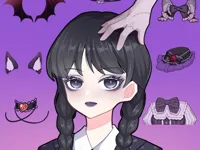
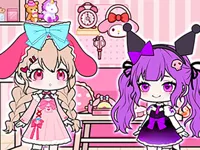
Anime Avatar Maker is a browser game centered on building your own anime-style character by mixing features until the look feels right. You normally start with the basics, like face shape and skin tone, then move through hair, eyes, and outfits, adjusting colors and small details as you go.
If you enjoy making characters and tweaking visuals, it fits nicely with creative browser games and quick-play titles you can launch from New Games when you want something calm and low pressure. It is also a good match for light sessions where you want to create something cute, funny, or stylish in just a few minutes.
Because the focus is customization, the best part is experimentation. A small change, like a different eyebrow shape or a new color palette, can completely shift the vibe. In Anime Avatar Maker, that moment of finding the perfect combination is the reward.
Players like games like Anime Avatar Maker because the goal is clear and personal. You are not chasing a timer or trying to beat an opponent. You are trying to make a character that looks the way you want, and that makes each session feel unique.
Another reason is how relaxing the loop can be. Choosing pieces, testing colors, and swapping outfits is easy to understand, and it suits the same mellow pace many people look for in Casual browser games.
It is also friendly for sharing. Even if the game does not include a built-in save button, players often take a screenshot when they land on a design they like. The fun comes from trying new themes, like a school look, a fantasy vibe, or a bright pastel style, and then comparing results with friends or family.
Start by picking a base look, then move through each customization group one at a time. In Anime Avatar Maker, it helps to choose a hairstyle early, because hair usually sets the character mood and affects how accessories and outfits look together.
After that, fine-tune the face. Small choices like eye shape, mouth style, or blush can make a big difference, so it is worth pausing and comparing options before you commit. If there is a random button, use it as inspiration, not as a shortcut, and adjust what it gives you into something you actually like.
To finish, match colors across the whole character. Try repeating one accent color in two or three places, like hair highlights, an accessory, and shoes, so the design feels intentional instead of cluttered. For more creativity-focused play, explore styles similar to Drawing and character design games where experimenting is part of the fun.
The gameplay in Anime Avatar Maker is menu-driven and choice-based. You select features from panels, preview changes instantly, and keep swapping pieces until the character looks right. Many avatar makers organize options into clear categories such as hair, eyes, clothes, accessories, and background, so you can work in layers without getting lost.
Your main objective is self-set: create an avatar that matches a theme, a mood, or a character idea. Difficulty, when it exists, comes from making choices that work together. As you add more items, it is easier to overdo it, so the challenge becomes editing your design and removing pieces that distract from the overall look.
If the game provides color sliders or multiple palettes, the best results usually come from limiting your palette. Pick two main colors and one accent, then apply them consistently. When you want a softer finish, use lighter shades for large areas like outfits, and save bold colors for small details like ribbons or jewelry.
Some players treat Anime Avatar Maker like a mini creative exercise. Set a simple rule before you begin, like “only cool colors” or “sporty outfit only,” then see how many different avatars you can make within that constraint. That approach keeps sessions fresh, especially if you like creative games connected to Coloring and visual customization.
What makes Anime Avatar Maker enjoyable is the direct feedback loop. You change one part and immediately see whether it improves the character or throws the style off. That instant preview encourages playful testing and helps you learn what combinations look good together.
It also supports many play styles. Some people build a character that represents them, while others create a completely new persona. If you like making themed looks, it pairs well with outfit-driven games like Wedding Dress Designer where styling choices are the main focus.
Start simple and build up. Pick a hairstyle and outfit first, then adjust the face to match the vibe. If you begin by changing every small facial detail, you may end up rebuilding everything once you switch the outfit later.
Use one accent color to tie the design together. For example, if you choose a red bow, repeat that red in shoes or a small accessory. In Anime Avatar Maker, this trick makes avatars look more polished with very little effort.
Watch for visual clutter. Too many accessories can hide the face, and the face is often the focal point. If the character looks busy, remove one or two items before you add anything else.
When you get stuck, set a theme and follow it strictly. Try “school uniform,” “winter outfit,” or “idol style,” then only choose items that fit that idea. This helps you avoid random choices that do not match.
If you want more inspiration, check styling games like Makeup Kit, then come back and apply similar color ideas to your avatar. Even simple makeup-style palettes can help your character feel cohesive.
If Anime Avatar Maker is not working properly, try this:
These games are similar because they focus on creative customization, quick sessions, and making something you can tweak until it feels finished.
Yes. You can play Anime Avatar Maker for free on a computer directly in your browser, so you can start designing right away without installing anything.
Anime Avatar Maker is a browser character creator where you build an anime-style avatar by choosing facial features, hair, outfits, accessories, and colors until the character matches your idea.
Open the game, pick a base character look, then customize category by category. Start with hair and outfit, then fine-tune the face, and finish by matching colors across the whole design.
If you want more ready-made ideas, browsing Best Games can help you find other creative titles that spark themes you can try in your next avatar.
Yes, Anime Avatar Maker is free to play online.
That makes it easy to create multiple avatars and try different styles whenever you have a few minutes.
Keep your first avatar simple and focus on matching colors. In Anime Avatar Maker, a clean design with a consistent palette usually looks better than adding every accessory at once.
You can play Anime Avatar Maker on NiaGames in your browser, on desktop or mobile, whenever you want a quick creative session.
No. Anime Avatar Maker runs in your browser, so you can start instantly with no downloads or installers.
Yes. Anime Avatar Maker works on mobile and tablet browsers, and most actions are done with taps and simple dragging so you can customize comfortably on a touchscreen.