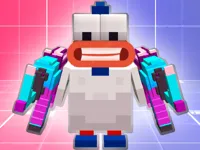
Play Chicken, a fun Multiplayer First-Person Shooter game you can enjoy instantly in your browser. No Download, Free to Play, and playable on PC, mobile, and tablet.
Genre: Multiplayer First-Person Shooter | No Download | Free to Play
This game takes classic arena shooting and swaps the usual soldiers for feathered fighters. You jump into quick matches on online servers, pick a mode, and focus on clean aiming, smart movement, and staying alert around corners. If you enjoy first-person shooter games that keep the action moving, it fits that same fast rhythm with a lighter tone.
There are competitive modes like Red vs. Blue and Free-for-All, plus an Arms Race option that keeps things changing as the match goes on. It also leans into the broader shooting style with simple controls, an easy way to hop into a lobby, and enough variety to make each round feel different. For players who like chaotic arenas, the battlegrounds setup makes positioning and timing matter.
Most people can start having fun in minutes because the basics are familiar: move, aim, and shoot. At the same time, the skill ceiling is real, so the more you play, the more you notice how much little choices change the outcome, especially in multiplayer lobbies where every opponent reacts differently.
The tone is also part of the appeal. Landing a clean win in a silly chicken shooter feels funny without losing the competitive edge, which is why it often gets shared as a funny pick for friends. If you like blocky or playful visuals, the Minecraft vibe is a nice bonus, and the fact it works well on mobile makes it easy to squeeze in a match anywhere.
Hit Play, let the match load, and choose a server with the mode you want. Once you spawn, keep your crosshair steady, use cover, and focus on winning duels one at a time instead of rushing into open space. Team modes reward coordination, while solo modes reward awareness and smart fights, which is why it can feel intense in PvP rounds even when the theme is playful.
Each round drops you into an arena where the main goal is to score eliminations and stay alive long enough to control the pace of the fight. In Red vs. Blue, you play for team points, so it helps to move with teammates, trade shots, and avoid giving the other side easy picks. In Free-for-All, it becomes a personal survival test where you win by choosing good angles and staying ready for surprise attacks.
Arms Race brings a different tempo by shifting what you use as the match progresses, so you need to adapt quickly and keep pressure on. New players usually improve fastest by slowing down, aiming before turning corners, and learning where fights usually start. Over time, you will read the map better, react faster, and turn close scrambles into consistent wins.
It is the contrast that works: the controls and tactics feel like a real arena shooter, but the presentation keeps things light. That mix makes it approachable for casual play while still rewarding anyone who wants to practice aiming, positioning, and timing.
Because it runs in the browser, you can jump in without installs, and it is easy to share. One match can be a quick break, and the next can turn into a serious streak if you find a lobby that matches your skill.
If you want to improve quickly, focus on staying consistent rather than trying to win every fight with speed alone. These habits help in both team modes and solo rounds.
If Chicken is not working properly, try this:
If you like the mix of quick aiming duels, short rounds, and simple controls, these picks offer a similar pace and action focus.
Yes. You can play it in your browser without paying, and it works best with a mouse and keyboard for aiming.
It is a multiplayer first-person shooter where you play as a chicken and compete in online modes like team battles and free-for-all matches. The goal is to outplay opponents through aim, movement, and smart positioning.
Press Play, wait for the game to load, then pick a server or mode that looks fun. After you spawn, follow the on-screen prompts and focus on steady aim and safe movement.
Yes, Chicken is free to play online.
Start by playing slower than you think you need to, and take fights from cover. When you feel comfortable, work on keeping your crosshair ready before turning corners.
You can play it on NiaGames in your web browser. Just open the game page and jump into a server when it finishes loading.
No. It runs in the browser, so you can start playing without installing files or apps.
Yes, it works on mobile and tablet browsers. For better control, play in landscape mode and use a stable connection so matches feel responsive.