Play Triple Tile, a fun tile-matching puzzle game you can enjoy instantly in your browser. No Download, Free to Play, and playable on PC, mobile, and tablet.
Genre: Tile-matching puzzle | No Download | Free to Play
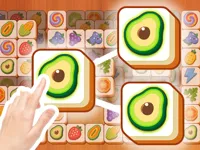
Triple Tile is a relaxed matching game built around one simple idea: clear the board by collecting three identical tiles at a time. You tap a tile, it moves into a small holding tray, and when you line up three of the same symbol they disappear and open space for your next choices.
The twist is that not every tile is available. Many pieces sit under others, so your best move is often the one that reveals new options rather than the one that looks satisfying right now. If you enjoy careful planning and short, repeatable rounds, it fits right in with other Puzzle Games.
It feels easy to start but rewards attention. Choosing which tile to pull first changes what gets uncovered, and that makes each board a small logic puzzle instead of a mindless tap-fest.
Another reason is the clean, readable matching loop. If you already like games tagged Matching or even classic Match 3 puzzlers, the “make sets” goal will feel familiar, but the layered stacks add a different kind of pressure.
Finally, it is friendly on touch devices. The pace works well for quick breaks on a phone, and the core controls are built for Touchscreen play without needing fast reactions.
The objective is to clear every tile from the board. Tap tiles that are not blocked, send them to your tray, and create groups of three identical tiles to remove them from the tray automatically.
Your main limit is tray space. If you keep adding different symbols without finishing triples, the tray fills up and you will get stuck. That is why it helps to think in small sequences and to keep one or two “nearly completed” matches active instead of collecting random tiles.
Most boards start with obvious moves on the top layer, but the real challenge begins once you expose a mix of symbols underneath. A good habit is to scan for duplicate pairs before tapping anything, because pairs tell you which triples are realistic in the next few moves. If you only see one copy of a symbol, taking it early can clog your tray and reduce flexibility.
Difficulty usually ramps through denser stacks and less visibility. You will notice more situations where a needed third tile is buried under several layers, so the best path is often “open the board first, match second.” When you are unsure, prefer tiles that reveal multiple new tiles or that connect to an existing pair in your tray.
To keep sessions fresh, rotate between pure planning and speed-cleaning. When a board is flowing, keep your tray tidy by completing triples quickly. When it is tight, slow down, count what you have, and treat each tap like a commitment that should lead to a match soon.
If you like this style of clear-the-board puzzling, you can also try a quick round of Block Blast for a different kind of spatial planning, or switch to Ball Sort when you want a more controlled “set-building” puzzle.
The most interesting part is how the tray turns a simple match rule into a planning puzzle. You are not just matching what you see, you are managing limited space while trying to uncover the right pieces. That makes the same symbols feel different depending on when you take them.
It also scratches the “organize and clear” itch without needing complex rules. If you enjoy the calm, methodical vibe of Mahjong style games, you will recognize the importance of unblocking tiles and thinking ahead, even though the matching rule is based on triples.
These tips focus on staying flexible and avoiding tray lockups. The best players are not the fastest, they are the ones who keep options open.
If a board feels impossible, it usually comes down to one early choice that filled the tray with too many different symbols. Reset your approach: focus on creating one triple quickly, then use the extra space to open the board again.
If Triple Tile is not working properly, try this:
These picks match the same “clear the board by planning around blocked tiles and limited options” pace, with an emphasis on careful selection over fast reflexes.
Yes. You can play it directly in your browser on NiaGames without installing anything, as long as you have a stable internet connection.
It is a tile-matching puzzle where you clear a board by collecting three identical tiles at a time. The main challenge comes from stacked tiles and limited tray space.
Press play, then tap or click any tile that is not blocked. Build triples in the tray to remove them, and keep clearing until the board is empty.
Yes, Triple Tile is free to play online.
Start by making one quick triple to create breathing room, then focus on tiles that reveal new layers. Avoid filling the tray with many different symbols, and try to keep at least one pair ready so you can complete a triple soon.
You can play it on NiaGames in your browser. For more games in the same style, explore the Html5 Games tag and other puzzle picks on the site.
No. It runs in the browser, so you can start playing immediately without downloads or installs.
Yes. The game works on phones and tablets, and the tap-based controls are designed to feel comfortable on smaller screens.