Play Fruit Names, a fun educational puzzle game you can enjoy instantly in your browser. No Download, Free to Play, and playable on PC, mobile, and tablet.
Genre: Educational Puzzle | No Download | Free to Play
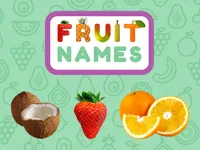
Fruit Names is a simple learning game where kids recognize fruits by their pictures and connect them to the correct name. It focuses on clear visuals, easy choices, and quick feedback, so children can learn without getting stuck.
Because it is designed for younger players, the pace is gentle and the goal is always clear. If you are browsing educational titles for kids, this one fits well as a short practice game you can replay whenever you have a few minutes.
Parents like that it feels safe and straightforward: see a fruit, hear the word, then choose the match. For children, it is satisfying to get instant confirmation and try again right away when they miss.
The game works well for quick sessions, so it is easy to play between activities or as a calm screen-time option. It also fits nicely alongside other casual picks that families can share, especially if you enjoy family friendly games that do not require complicated rules.
Since it runs in a browser, it is convenient on phones and tablets too. If your child prefers tap-based play, it pairs naturally with mobile and touchscreen games that use simple on-screen inputs.
Start a round and pay attention to the fruit shown on the screen. The game can pronounce the word, and your job is to select the correct name or pick the matching picture, depending on the prompt in that moment.
On PC, you mainly use the mouse to click the right answer. On a phone or tablet, tap the option you want, then move on to the next prompt. If a timer appears, focus on accuracy first, then speed up once the fruits feel familiar.
This style of practice helps build recognition in a way that feels like play. It is also a nice entry point for puzzle learners who enjoy word based challenges without long instructions.
In Fruit Names, rounds typically revolve around matching: you see a fruit and choose the right label, or you hear a label and choose the right fruit. Correct answers keep your streak going, while mistakes are a chance to slow down and look closely at shape, color, and small details.
Difficulty can rise naturally as more fruits appear, choices become more similar, or the timer becomes tighter. The best approach is to treat early rounds as practice and later rounds as a quick review of what your child has already learned.
Because fruits are part of everyday life, the game connects learning to real-world moments. It also fits well with other kid-friendly themes like fruit and food, where vocabulary becomes easier to remember through repeated, visual prompts.
The best part is how direct the learning loop is: prompt, choice, feedback, repeat. That repetition helps kids build confidence, and it also makes the game useful for quick review when a child forgets a fruit name.
It is also a good “independent play” option because the controls are simple and the game does not depend on long text. Even when a player misses an answer, the next attempt comes quickly, which keeps frustration low.
Accuracy matters more than speed at the start. Encourage your child to say the word out loud after a correct answer, then point to the fruit again to reinforce the connection.
If the game uses a timer, try a two-step rhythm: first identify the fruit by shape, then confirm with color and details. That small habit can reduce fast mistakes.
If Fruit Names is not working properly, try this:
If you want more games with quick prompts, matching, and simple learning-focused play, try these picks with a similar pace.
Yes. You can run it directly in your browser on a PC, so it is easy to start a quick learning session without installing anything.
It is a kid-friendly matching game that helps players learn fruit vocabulary by connecting pictures and names, often with audio pronunciation support.
Open the game page, start a round, and follow the prompt on screen. Then click or tap the option that matches the fruit shown or spoken.
Yes, Fruit Names is free to play online.
Go slowly at first and focus on recognizing shape and color. If audio is available, repeat the word after each correct match.
You can play it on NiaGames in your browser, whether you are using a computer, phone, or tablet.
No. The game runs in the browser, so you can start playing right away without downloads.
Yes. It works on mobile and tablet browsers, and the simple tap controls make it comfortable on touch screens.