Play lost in the woods, a fun adventure puzzle game you can enjoy instantly in your browser. No Download, Free to Play, and playable on PC, mobile, and tablet.
Genre: adventure puzzle | No Download | Free to Play
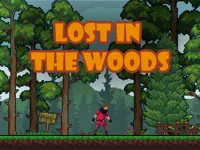
This is the kind of game that drops you into a forest setting and asks you to keep your head clear while you search for a way out. It leans into adventure pacing, but the real progress comes from noticing small details and using them to choose smarter routes.
Instead of relying on fast reactions, you are usually making choices about direction, timing, and where to check next. Many moments feel like a compact maze, where the wrong turn is not the end, but it costs you time and focus.
If you like slow, steady problem solving, the loop fits nicely. You explore, test an idea, then adjust after you learn what the area is trying to teach you, which is a familiar rhythm in puzzle focused games.
Some sections also play like a light escape challenge. You might need to interact with objects, read signs, or connect clues in the right order, which is why it often feels comfortable for fans of point and click style exploration.
Players tend to enjoy the calm tension that comes from not fully knowing what is around the next corner. The best runs feel like you are building your own mental map, and each correct choice makes the forest feel more predictable.
It also works well as a 1 player game because the pace is personal. You can stop, think, and try something new without feeling rushed, then reset and take a cleaner route on the next attempt.
Another reason it stays interesting is how often it rewards careful observation. When you spot something hidden in the background or remember a landmark you passed earlier, the game starts to feel less random and more like a solvable problem.
Start with a slow first run and treat it like scouting. Your goal is to learn what the game considers a clue, how interaction works, and which paths loop back so you do not waste time later.
Once you understand the basics, focus on consistency. The more you repeat a clean route and verify what each clue means, the less you will depend on luck.
The core gameplay is about exploring the woods, selecting routes, and using environment details to guide your next choice. You will often move between open paths and tighter areas, then decide whether to keep going forward, check a side route, or return to a familiar point.
Objectives usually stay simple, but the difficulty rises as the layout becomes harder to read. Later stretches tend to add more branching options and less obvious hints, so the challenge shifts from moving around to staying oriented and remembering what you already tested.
If you enjoy games where thinking matters as much as movement, this fits neatly alongside other Puzzle Games. The most satisfying moments come when you connect two small clues, pick the correct direction with confidence, and realize you are improving because of what you noticed, not because you moved faster.
What makes this style of game stand out is how it turns small observations into real progress. When you start recognizing patterns, you stop wandering and begin making intentional decisions, which feels rewarding without needing complicated systems.
It also encourages a thoughtful pace. Instead of pushing you to rush, it rewards careful movement, smart backtracking, and taking the time to confirm a clue before you commit to a long path.
Try to play in short, focused bursts. A clear head matters more than speed here, and you will make better choices if you slow down when the layout starts to feel confusing.
When you get stuck, do not change everything at once. Pick one new plan, follow it fully, and then judge whether it helped, so your learning stays clean.
If lost in the woods is not working properly, try this:
These picks match the same slow exploration, clue spotting, and route testing pace, with mysterious locations that reward careful play.
Yes. It runs directly in your browser on desktop, so you can start playing with no setup beyond an internet connection.
It is an adventure puzzle game focused on navigating a forest, finding clues, and choosing routes that slowly lead you toward the correct way out.
Press play and do a slow first run to learn the controls and identify a few landmarks. After that, restart with one clear plan and test routes one by one so you learn faster.
Yes, lost in the woods is free to play online.
Move carefully, backtrack early when a route feels unproductive, and focus on one clue at a time. Treat each wrong turn as useful information so you can narrow the map instead of getting frustrated.
You can play it on NiaGames in your web browser, whether you are on a computer, tablet, or phone.
No. The game loads in your browser, so you can play instantly without installing files or apps.
Yes. It works on mobile and tablet with touch controls, and it is easy to switch devices for quick sessions.