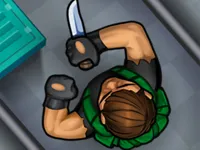
Play Assassin Knight, a fun action-adventure game you can enjoy instantly in your browser. No Download, Free to Play, and playable on PC, mobile, and tablet.
Genre: action-adventure | No Download | Free to Play
This is a quick, skill-focused game built around clean movement and smart timing. You guide a lone knight through enemy-filled areas where getting to the next safe spot matters as much as landing hits. The pace stays snappy, so each run feels like a short challenge you can retry and improve.
Expect a mix of reaction and decision-making rather than long tutorials. If you like browser titles that sit between action and adventure, this one fits that sweet spot where a small mistake can be recovered with a calm reset and better spacing.
It rewards small improvements. Once you learn how far your character moves per tap or key press, you start planning routes and picking safer angles instead of rushing forward. That feeling of “I can do this cleaner” is what keeps the loop addictive.
The sessions are also easy to fit into a break. Whether you treat it like a lightweight arcade run or a tighter 2D challenge, the fun comes from reading patterns, staying patient, and finishing a section without panic.
Start the game, then focus on two basics: positioning and timing. Move into safe lanes, wait for openings, and commit only when you can finish the action without getting cornered. If you rush, you will spend more time resetting than progressing.
When enemies or hazards appear in clusters, think in steps. Take a small move, check the next danger, then act. This approach works especially well in side-scrolling layouts where the screen encourages forward momentum, but the safest play is often a short pause.
The core loop is simple: advance through each area, deal with threats, and survive long enough to reach the next checkpoint or finish line. Most of the challenge comes from juggling movement and attacks so you do not overextend. A clean run often looks slow at first, then fast once you know where the safe gaps are.
Difficulty typically rises by adding tighter spaces, faster enemy cycles, or situations where two threats overlap. That is where decision-making matters: do you commit to a quick strike, or do you back up and reset the pattern? If the game leans into melee combat, treat every swing like a commitment and keep your exit path open with disciplined spacing.
As you progress, you will likely notice that “winning” is less about perfect reactions and more about reading the room early. Watch for repeated behaviors, then adjust your timing window. If you enjoy games built around close-range fighting, you will feel at home once you stop trading hits and start controlling the pace.
It focuses on the satisfying basics: move, decide, and act with intent. Instead of filling the screen with distractions, the challenge comes from learning when to step in and when to hold back. That makes each clear feel earned, even when the level design stays straightforward.
The theme also helps the moment-to-moment choices feel meaningful. Whether you see your character as a stealthy striker or a brave brawler, the best runs come from balanced offense and defense. If you like the idea of melee play with sword pressure and weapons timing, this style of loop tends to stay replayable.
1) Move in small steps. If you keep drifting forward, you will walk into overlapping threats. Make a short move, pause, then decide whether the next action is safe.
2) Do not attack from the middle of a crowd. Try to pull threats into a simpler angle first. When you attack from the edge, you leave yourself an escape route if something changes.
3) Watch for cycle patterns. Many hazards repeat. Once you spot the rhythm, you can time your move through a gap instead of guessing.
4) Reset your spacing after every success. After you clear one enemy or obstacle, step back into a safe pocket and reassess. This habit prevents chain mistakes and makes longer runs consistent.
Common mistakes to avoid: over-committing to a swing, rushing into a narrow corridor, and moving again before the screen “settles.” The fix is simple: slow down for two seconds, then speed up when the path is truly clear.
If you are playing as a 1 Player, treat the run like a personal time trial. Your best improvements come from repeating the same section and cleaning up one decision at a time, not from trying to brute-force the whole level in one go.
If Assassin Knight is not working properly, try this:
If you like the same quick reactions, close-range action, and short retry-friendly runs, try these picks with a similar pace and feel.
Yes. You can run it directly in your browser on PC, and it is designed for quick sessions with simple controls.
It is a browser action game where you guide a knight through danger zones, using careful movement and well-timed attacks to survive and progress.
Load the game, press the start button, and begin with slow, controlled moves. Once you see the first few enemy or hazard patterns, speed up only when the path is safe.
Yes, Assassin Knight is free to play online.
Keep your spacing, attack from the edges, and pause for a moment after each successful move so you do not chain mistakes. If a section feels impossible, it usually means you are moving too far per step.
You can play it right here on NiaGames in your web browser, without installing anything.
No. It runs in the browser, so you can jump in instantly and start playing.
Yes. It is playable on mobile and tablet, using touch controls like tap and swipe for movement and actions.