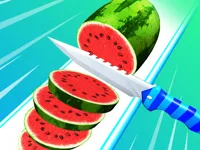
Play Food Slicer Food Cutting, a fun arcade slicing game you can enjoy instantly in your browser. No Download, Free to Play, and playable on PC, mobile, and tablet.
Genre: Arcade slicing | No Download | Free to Play
Food Slicer Food Cutting is a simple, skill-based slicing game where your job is to cut food into clean, even pieces while keeping your timing under control. You will swipe across bread, fruits, and vegetables, aiming for smooth cuts instead of messy chops. It is the kind of quick browser session that feels satisfying because every slice has an immediate result.
The challenge usually comes from speed and accuracy. As the pace rises, you need to react faster and keep your slice line steady, all while avoiding the wooden deck or other “do not cut” areas. If you enjoy short rounds that reward focus, you will probably also like other quick action titles in the Arcade Games section.
Players stick with Food Slicer Food Cutting because it is easy to understand but not always easy to master. A clean slice feels earned, especially when the game asks you to cut smaller targets or keep a consistent rhythm across multiple items. One moment you are calmly slicing, and the next moment you are trying not to panic when the speed ramps up.
It also fits well as a quick break game. If you are browsing from a phone, it plays naturally with touch controls, and it shares that fast restart flow common in Hypercasual Games. If you like simple mechanics with real improvement over time, browsing Casual picks can lead you to similar experiences.
The core loop is straightforward: a piece of food appears on a board and you slice across it to cut it into segments. Your goal is usually to make accurate cuts that match the game’s expectations, whether that means “as many slices as possible” or “slice into even parts” depending on the level style. In Food Slicer Food Cutting, the best results come from smooth swipes rather than rushed flicks.
Difficulty tends to build through pace and precision. You might get less time to react, smaller cutting windows, or sequences that punish sloppy swipes. The wooden board is part of the risk, so over-slicing can cost you progress even if you hit the food. If you like improving your consistency and hand control, you can also explore games tagged with Timing and Skills.
As you continue, treat each attempt like a small practice run. Make one or two careful swipes, stop, then adjust your next cut based on what went wrong. That habit helps when you hit faster rounds where the game tests your reaction and your ability to keep slices clean. This is the same “repeat and refine” feel many players enjoy in quick titles like Fruit Slice Master.
Food Slicer Food Cutting stands out when you approach it like a mini skill challenge instead of a random swiping game. The board hazard forces you to commit to a clean line, and the best runs come from calm, deliberate movement. That extra risk turns basic slicing into a small test of control.
It is also satisfying because mistakes are obvious. If your swipe is too long, too short, or off-angle, you can see it right away and correct it on the next round. If you enjoy “simple to learn, hard to do perfectly” games, you might also get a similar vibe from food-themed quick plays like Sugar Factory.
Start by prioritizing accuracy over speed. In Food Slicer Food Cutting, a slow clean slice usually beats a fast messy one, especially if the board punishes over-slicing. Keep your swipe short and controlled, and only extend it as far as you need to finish the cut.
Use the edges of the food as guides. If you aim from edge to edge, your cut line stays predictable and you are less likely to slip into the board. This is also a good time to remind yourself to breathe and reset between slices, because tension makes your hand jumpy.
Watch for patterns in how items appear. Some levels feel like they repeat the same spacing, so you can prepare your next swipe before the food fully settles. If you want to practice that kind of steady rhythm, quick games like Smoothie King can be a fun follow-up for players who like repeatable timing and short rounds.
Common mistakes are easy to fix once you notice them. If you keep hitting the board, shorten your swipe and lift earlier. If your slices are uneven, slow down and focus on one consistent motion instead of trying to “correct” mid-swipe. Over time, this helps you keep control when the pace increases.
If Food Slicer Food Cutting is not working properly, try this:
If you like quick swipes, fast restarts, and accuracy-driven levels, these games match the same short-session pace and simple control style.
Yes. Food Slicer Food Cutting runs in your browser, so you can play on a computer without installing anything, as long as you have a stable connection.
Food Slicer Food Cutting is a quick arcade slicing game where you swipe to cut foods into neat pieces while avoiding mistakes like slicing into the board. It is focused on timing, control, and repeatable short levels.
Open the game page and begin the first level. Use a short swipe to test how sensitive the slicing feels, then adjust your speed. If you want more quick browser games like this, you can browse Online and Html5 Games tags for similar instant-play options.
Yes, Food Slicer Food Cutting is free to play online.
Keep your swipes short and controlled, and stop slicing the moment you finish the cut. In Food Slicer Food Cutting, most early mistakes come from over-slicing into the board or trying to “fix” a cut mid-swipe. Stay steady, and aim edge-to-edge.
You can play Food Slicer Food Cutting right here on NiaGames in your browser. If you are in the mood for more food-themed quick games, you can also try Cooking Games For Kids for another simple, browser-friendly option.
No. Food Slicer Food Cutting is a browser game, so you can start playing without downloads or installs.
Yes. The game is designed to work on mobile and tablet with swipe controls, which makes it a good fit if you like quick touch games. You can also browse the Mobile tag to find more games that feel natural on touchscreens.